The Workspace API connects tournament systems, editorial tools and other external services to your saved sOU data. A service can prepare teams, players, competitions, maps, matches, vetoes and results. Connected desktop clients receive these changes through their existing synchronization. This integration requires no additional desktop update.
Requirements and scope
You need a confirmed, unsuspended account and access to the intended workspace. Readers may read data. Editors and Managers can also grant write access. A workspace key belongs to your account and exactly one workspace; it never grants more permissions than your current role. Creating a personal key does not make it visible to other members.
The API edits saved workspace data. It does not start HUDs, activate a match or control OBS, CS2, HLAE or the observer. Live GSI, radar and killfeed data are not sent to the cloud. Personal preferences, local paths and credentials are outside this API. The local HUD API is a separate interface.
Create API keys in your account
- Sign in to the website, open “Your account”, then “Workspace and Creator API” and “Manage API keys”.
- Enter a recognizable name, such as your tournament system's name. Names have a maximum of 100 characters.
- Select the workspace. Only workspaces you can currently access are listed; the UUID is displayed for API requests.
- Select “Read only” or “Read and write”. Write access requires Editor or Manager role and includes deletion tombstones and image uploads.
- Choose a validity of 1 to 365 days; the default is 90 days. Select “Create key”.
- Immediately copy the complete key into your service's confidential configuration. After selecting “Close key display” or loading the page again, it will not be shown again.
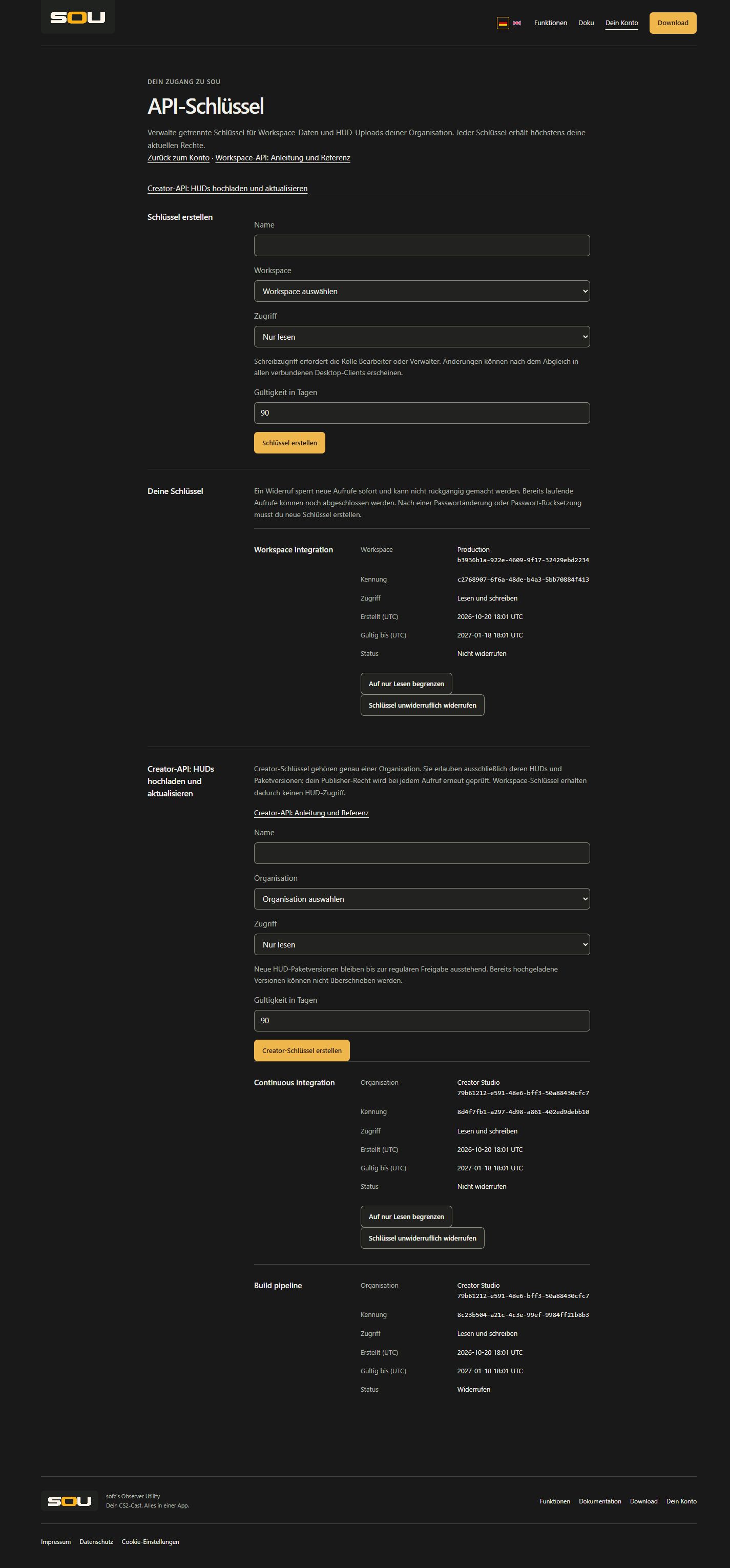
The list shows name, workspace, identifier, access, creation time, expiry time and status. All times are UTC. Under a valid key, choose “Restrict to read only” or “Allow reading and writing” to change access; your current workspace permissions are checked again. The workspace binding and expiry remain unchanged. Changing or resetting your password invalidates previous keys. Replace expired keys or keys invalidated by password changes.
“Permanently revoke key” blocks further authenticated requests. Requests already in progress may still complete. Revocation cannot be undone. To rotate a key, create a replacement, update your service, verify a read request and revoke the old key. Revoke an exposed key immediately. Each account may have at most 50 unrevoked workspace and creator keys combined; revoke expired entries too when making room.
Address and authentication
The base address is https://www.getsou.app/api/v1/integration. Send the complete key exclusively in the Authorization: Bearer … header over HTTPS. Desktop sign-in tokens and browser cookies cannot replace this key. Workspace keys authorize only the documented workspace entity and media operations. HUD uploads require a separate creator key. Neither key type authorizes account, member, organization or platform administration, or HUD approval.
Use a separate key per integration and keep it in a server-side secret configuration. Never publish it in browser code, Git, URLs, screenshots or logs. sOU stores a SHA-256 digest rather than the complete key, along with its identifier, owner, workspace, name, access, creation/expiry time and revocation time when applicable. Changes and successful writes are audited with the account and key identifier; neither the key secret nor entity contents belong in these records.
Download OpenAPI
The complete machine-readable OpenAPI description download describes all 51 operations, parameters, authentication, typed requests and responses, and limits. Import the public file into an API client or use it to generate a client. Each resource has its own content schema and concrete write and response schemas. The resource path determines the type of data; there is no generic document-kind parameter. This description is versioned independently of the local HUD API.
All endpoints
The following operations apply to each of the ten resources: teams, players, competitions, seasons, sections, maps, map-pools, matches, startup-configs, panel-templates. Replace {resource} with one of these path names.
| Method and path relative to the base address | Effect |
|---|---|
GET /workspaces/{workspace}/{resource} | Reads the typed collection including tombstones. |
GET /workspaces/{workspace}/{resource}/{id} | Reads one entity or its tombstone; unknown identity: 404. |
PUT /workspaces/{workspace}/{resource}/{id} | Creates, fully replaces or restores an entity. |
DELETE /workspaces/{workspace}/{resource}/{id}?expectedRevision=1 | Marks an entity deleted with revision protection. No physical deletion; unknown identity: 404. |
GET /workspaces/{workspace}/snapshot | Reads all ten typed collections in one snapshot including tombstones. |
POST /workspaces/{workspace}/changes | Atomically writes up to 5,000 changes grouped by entity and returns the full typed snapshot. |
POST /workspaces/{workspace}/media/check | Reports missing images. Requires current Editor or Manager role; a read-only key is sufficient. |
PUT /workspaces/{workspace}/media/{name} | Uploads an image before it is referenced. |
GET /workspaces/{workspace}/media/{name} | Downloads the unchanged image bytes from this workspace. |
Read the snapshot and preserve identities
Replace the workspace UUID with the value from key management. This shell example takes the key through hidden input for this session. Use your service’s secret management for a persistent integration.
read -r -s -p 'sOU API key: ' SOU_API_KEY
export SOU_API_KEY
export SOU_WORKSPACE='00000000-0000-0000-0000-000000000000'
curl --fail-with-body \
  -H "Authorization: Bearer $SOU_API_KEY" \
  "https://www.getsou.app/api/v1/integration/workspaces/$SOU_WORKSPACE/teams"
A collection returns an array of typed resources with id, revision, deleted and data. A single read returns one such resource. The full snapshot contains the fields teams, players, competitions, seasons, sections, maps, mapPools, matches, startupConfigs, panelTemplates. Revisions count per entity. Identities are unique within the entity type and workspace, are case-sensitive and contain 1 to 100 ASCII letters, digits, underscores or hyphens. Players use their 17-digit SteamID64 as identity. Preserve identities when renaming entries. Contents must include the same identity in data.id; players use data.steamId.
Write and replace entities
For creation, expectedRevision is 0. For updates, use the last read revision. data replaces the entire entity; omitted optional fields take desktop defaults on import. Before changing one field, read the current contents and preserve the other fields. A successful response returns the increased revision and confirms cloud storage, not application to a running cast.
curl --fail-with-body -X PUT \
  -H "Authorization: Bearer $SOU_API_KEY" \
  -H 'Content-Type: application/json' \
  --data '{"expectedRevision":0,"data":{"id":"team-alpha","name":"Team Alpha","shortName":"ALP"}}' \
  "https://www.getsou.app/api/v1/integration/workspaces/$SOU_WORKSPACE/teams/team-alpha"
Unknown resources, unsupported fields, wrong types, mismatched identities and negative revisions are rejected. Names cannot contain only whitespace. Image references must point to files already uploaded into this workspace. References are validated against the resulting snapshot: a match needs two different existing teams. Use a changes batch to create dependent entities together.
Write related changes atomically
{
  "teams": [
    {"id":"team-bravo","expectedRevision":0,
     "data":{"id":"team-bravo","name":"Team Bravo","shortName":"BRV"}}
  ],
  "matches": [
    {"id":"final-2026","expectedRevision":0,
     "data":{"id":"final-2026","name":"Finale","teamA":"team-alpha","teamB":"team-bravo","bestOf":3,"mapIds":[],"vetos":[]}}
  ]
}
Send this object as JSON to POST /workspaces/{workspace}/changes. At least one nonempty collection is needed; omitted collections remain unchanged. Field names match the full snapshot. Each identity may occur only once per collection. All expected revisions must match; otherwise no part is saved. References must be valid in the resulting snapshot regardless of order. A deletion contains id, expectedRevision, deleted:true and omitted or data:null. Automatic desktop result-source fields are rejected. Coordinate result changes with cast operators; changes do not claim an automatic result source.
Entities and fields
This list contains every permitted top-level field. OpenAPI schemas specify required fields, types and limits. State numbers use the numeric enum values listed here rather than translated labels. Lists are treated as a single field during synchronization.
| Resource | Fields and meaning |
|---|---|
teams | id, name, shortName, logo, faceitId, dachcsId. Name maximum 100, short name maximum 16 characters. |
players | steamId, name, teamId, avatar, isCoach. SteamID64 is a 17-digit string; team assignment is optional. |
competitions | id, name, logo, sponsors. A sponsor contains id, name, image. Competition logos use PNG/JPEG; sponsor images additionally support GIF. |
seasons | id, name, competitionId. The competition must exist. |
sections | id, name, competitionId, seasonId, parentId, kind. Kind: 1 Region, 2 Division, 3 Phase, 4 Group, 5 Round, 6 Other. Parents must belong to the same competition and season; cycles are invalid. |
maps | id, name, gameName, logo, background. Game identifier must be unique, at most 128 characters using lowercase letters, digits, underscores, hyphens or slashes; consecutive slashes are invalid. |
map-pools | id, name, mapIds. Every map must exist and may appear only once. |
matches | id, name, startsAt, competitionId, seasonId, competitionSectionId, competitionRound, faceitId, dachcsId, teamA, teamB, bestOf, mapPoolId, winsA, winsB, mapIds, mapResults, vetos. Timestamp is ISO-8601 with a timezone or null; format is 1/3/5/7; both teams must exist and differ. Competition references must agree. |
startup-configs | id, name, content. Saved CFG contents; the API request does not execute them. |
panel-templates | id, hudId, version, values. A saved panel template, not a direct mutation of an open panel. |
A veto contains mapId, type and optional teamId: 0 unknown assignment, 1 Pick, 2 Ban, 3 Decider. Picks and bans require one of the two match teams; other kinds have no team. Banned maps must not appear in the played map order; every other decision must appear there. At most one decider is allowed, with no repeated map decisions. A BO1 cannot contain a team pick. When a map pool is assigned, every played or vetoed map must be part of that pool.
A map result contains mapId, status, scoreA, scoreB: status 1 Pending, 2 Live, 3 Completed. Pending maps have no round scores. Completed maps require two nonnegative, unequal scores. Only one map may be live; after the decisive series win, no further map may have result data. When a result list exists, completed maps determine the series score. When mapResults is null, the saved series totals apply. See Maps, pick/ban and results for operating rules.
Delete and restore
Use the DELETE route with the last read expectedRevision as a required query parameter. The server retains a tombstone with an increased revision and data:null, so clients that were offline can detect the deletion. It remains visible in collections, single reads and the full snapshot. Remove dependent references in the same changes batch. Restore with PUT using complete valid contents and the tombstone revision. Do not revert to revision 0. Removing an image reference does not delete a media file.
Upload images
Compute SHA-256 over the unchanged PNG, JPEG or GIF bytes. The filename consists of the lowercase 64-character hexadecimal digest and its extension. Check existing names through the media POST endpoint; the body contains names and the response contains missing. Upload only missing files with media PUT as binary data and Content-Type application/octet-stream. Then use /cast-media/{name} in the entity. External URLs and local machine paths cannot replace this upload. The same file must exist separately in every workspace that uses it.
Synchronization and conflicts
A connected desktop synchronizes approximately every 15 seconds; offline periods and network failures can delay application. While a HUD output is running, incoming changes wait for “Apply to cast now” or the end of output. Active match selection and manual CT/T assignment remain local. API requests cannot bypass these safeguards. A service receives no acknowledgement of when a specific desktop actually applied its data.
If the API and desktop edit different fields, the existing three-way merge can combine them. When both change the same field differently, or a deletion conflicts, the desktop user resolves it. Arrays, such as veto order, count as one field. On HTTP 409, reload the snapshot and compare it with your original baseline and proposed edits before resolving differences. Do not merely put the newest revision in front of unchanged old data. After a timeout or connection failure, a write may already have arrived; read the snapshot and compare contents before retrying. There is no separate idempotency key.
Creator API: upload and update HUDs
HUDs belong to an organization. Open API key management in your account and find “Creator API: upload and update HUDs”. Create a separate creator key with a name, organization, read or read/write access, and a validity of 1 to 365 days. Only organizations for which you hold explicit Publisher permission are listed. Owner or Administrator role alone is insufficient; a regular member with this permission may also use creator keys. The organization binding cannot be changed after creation.
Copy the key immediately; it is displayed only once. Send it exclusively in the Authorization: Bearer … header. Creator keys start with sou_hud_, workspace keys with sou_ws_. The key types are separate: workspace keys gain no HUD upload access, and creator keys gain no workspace or desktop access. Account state, the password security stamp, expiry, revocation, organization binding and current Publisher permission are checked on every request. After losing organization access, you can still revoke your own key in your account. Access changes, rotation and the total limit of 50 unrevoked keys work as described above.
| Method and path relative to the integration base | Effect |
|---|---|
GET /organizations/{organization}/huds | Reads only HUDs belonging to the bound organization. |
POST /organizations/{organization}/huds | Creates a HUD entry with a name and visibility; requires a write key. |
GET /organizations/{organization}/huds/{hud} | Reads an owned HUD entry including its identifier and package identity. |
GET /organizations/{organization}/huds/{hud}/releases | Reads all package versions with their hash and review state. |
POST /organizations/{organization}/huds/{hud}/releases | Uploads a new immutable package version; requires a write key. |
GET /organizations/{organization}/huds/{hud}/releases/{release} | Reads an upload and its review note. |
For a new HUD, create the entry first. The JSON body contains name, visibility (private, open or approval), and optional translations for the HUD details described below. The name must not be blank and has a maximum of 100 characters. The organization comes from the path and key, not from arbitrary JSON fields. Private HUDs are not listed; other visibility settings are listed, but subscriptions require approved packages. Store the returned HUD identifier.
read -r -s -p 'sOU Creator API key: ' SOU_CREATOR_KEY
export SOU_CREATOR_KEY
export SOU_ORGANIZATION='00000000-0000-0000-0000-000000000000'
curl --fail-with-body \
  -H "Authorization: Bearer $SOU_CREATOR_KEY" \
  -H 'Content-Type: application/json' \
  --data '{"name":"My HUD","visibility":"private"}' \
  "https://www.getsou.app/api/v1/integration/organizations/$SOU_ORGANIZATION/huds"
For an existing HUD, use its existing identifier; do not create another HUD for an update. Upload the complete .souhud package as raw binary data with application/octet-stream and no multipart wrapper. Uploads accept at most 128 MiB of compressed bytes and at most 128 MiB of total uncompressed data, 4,096 ZIP entries and a hud.json of at most 64,000 bytes. Unknown body lengths are bounded during streaming. The same package validation as in the desktop applies: safe ZIP paths, API version 2, supported runtime, valid entry point and a stable package identity. Package layout and building are documented under HUD package format and HUD development.
export SOU_HUD='00000000-0000-0000-0000-000000000000'
curl --fail-with-body \
  -H "Authorization: Bearer $SOU_CREATOR_KEY" \
  -H 'Content-Type: application/octet-stream' \
  --data-binary @my-hud-1.0.0.souhud \
  "https://www.getsou.app/api/v1/integration/organizations/$SOU_ORGANIZATION/huds/$SOU_HUD/releases"
The first package version binds its package identity to this HUD. Later versions must keep that identity; another HUD’s package identity is not allowed. Every version is immutable, including pending or rejected uploads. Updates therefore require a new valid version number. Existing packages and approvals remain intact. The response contains id, hudId, version, hash, state and review. Without creator trust, new uploads start as pending; after regular review they can become approved or rejected. If the uploading account has creator trust, a successfully validated new package immediately receives approved. Use a read request for the review state and note. The key cannot grant trust or change review decisions. Uploads do not change workspace subscriptions, install HUDs or start output. Existing desktop update and output safeguards remain unchanged.
Localized HUD details and media
GET /organizations/{organization}/huds/{hud}/details returns revision and translations. Use PUT at the same path to replace texts with {"revision":0,"translations":[{"language":"en","description":"My HUD","author":"Creator","authorUrl":"https://example.org","imprintUrl":null,"privacyUrl":null}]}. Always send the last read revision. Requests accept at most 512 KiB and 256 distinct language tags. Maximum lengths: description 8,000 characters; author 200; each URL 2,048. URLs must be absolute HTTP(S) addresses without credentials. Replacing texts preserves media. All fields are currently optional; every populated translated field requires its English en counterpart.
Upload media separately with POST /organizations/{organization}/huds/{hud}/media/{language}/{kind}?expectedRevision=…. kind is preview, gallery or demo. Send raw bytes with the appropriate Content-Type: image/png, image/jpeg, image/webp or video/mp4. Demo files also require Content-Disposition: attachment; filename="demo.mp4". Preview: at least 1920 × 900 pixels and at most 5,000,000 bytes; gallery: the same minimum resolution and at most 10,000,000 bytes per image; demo: MP4 only, at most 50,000,000 bytes. Upload English media of each kind first. Preview/demo uploads replace that language's previous file; gallery uploads add an image. Responses return updated details, revision and media identifiers.
GET /organizations/{organization}/huds/{hud}/media/{media} returns the file; DELETE at the same path with ?expectedRevision=… removes its reference. The last English file of a kind can only be removed after its other language versions are removed. All writes require a read/write key and current Publisher permission; reads remain limited to the bound organization. Reload and reconcile after 409. These details are outside immutable HUD packages. See HUD details for the desktop workflow and future required fields.
Access requests and direct grants
GET /organizations/{organization}/huds/{hud}/grants reads all access and request records for an owned HUD. GET /organizations/{organization}/huds/{hud}/requests returns only unhandled requests with requested:true and approved:false. Records contain hudId, workspaceId, approved, requested and the historical selectedReleaseId, which no longer controls version selection.
Use PUT /organizations/{organization}/huds/{hud}/grants/{workspace} with {"approved":true} to approve a request or grant direct access to an existing workspace code without any prior request. {"approved":false} denies a request or revokes access. Each decision sets requested:false, so denied or revoked records do not reappear as pending requests. An explicit new request from a workspace manager reopens it. Older unapproved records are not retroactively interpreted as pending requests and remain visible in the complete access list.
Read-only keys can inspect both lists. Decisions require a read/write key and current explicit Publisher permission for the bound organization. Success returns 204, an unknown workspace 404 and invalid input 400; JSON bodies are limited to 4,096 bytes. Grants apply to the HUD and do not install or start a package. After a lost response, read and reconcile the saved access record. Manual controls are also available in Web Creator management.
Trusted creators
Creator trust belongs to an individual account, including its creator keys. It does not automatically apply to other members of the organization. Explicit Publisher permission is still required for the target organization.
Trust applies to new uploads. Uploads already pending still require individual review. When trust is revoked, new uploads return to regular review; existing releases keep their status. Package validation, size limits and immutable versions still apply. Creator keys cannot grant trust or change review decisions.
After a lost upload response, read the versions and compare the version number and SHA-256 hash with your package before retrying. Conflicts return 409. Missing owned HUDs or versions return 404; insufficient scope or lost Publisher permission returns 403, invalid keys 401, wrong upload media type 415 and oversized requests 413. Both key types share 120 requests per minute per owner; observe Retry-After.
Limits and troubleshooting
The limit is 120 requests per minute per key owner, shared across their keys. HTTP 429 includes Retry-After in seconds. Batches contain at most 5,000 distinct entity changes; entity requests have an 8 MiB body limit. Each entity’s data is limited to 256,000 serialized characters. Images are at most 4 MiB. Media checks accept at most 5,000 distinct names and 400,000 body bytes. Bodies without a known length are also bounded. Prefer smaller related batches and bounded retries.
| HTTP status | Meaning and next steps |
|---|---|
| 200 / 204 | Cloud operation succeeded. A 204 response has no body. |
| 400 | Invalid JSON, fields, values or references. Check schemas, entity identity, required fields, media and resulting snapshot. Error responses may be empty; rely on the status. |
| 401 | Key is missing, incorrect, expired, revoked or invalid after a password change; account suspension or missing email confirmation can also cause this. Check account status and key management. |
| 403 | Workspace binding, key scope or current workspace role is insufficient. Role removal and leaving an organization are checked on every request. |
| 404 / 405 | Unknown path or entity, missing image or unsupported method. Check the base address and spelling. |
| 409 | Revision or concurrent database conflict. Reload and reconcile changes. |
| 413 / 429 | Reduce the request size or observe the specified delay. |
| 500 / connection failure | Account for a temporary service failure. Check the snapshot before retrying a write; do not retry indefinitely. |
Further rules for offline operation, roles and running outputs are in Workspaces and collaboration. Manage credentials under Manage API keys. Data processing information is provided under Workspace API and privacy.