sOU can import CS2-HUDs from the shared LHM-/JT’s HUD Manager family directly as a ZIP. The original renderer is preserved; sOU delivers the expected game, team, match and panel data via a local compatibility layer. You do not need an additional LHM or JT Manager.
The support refers to the CS2-HUD profile described here. Additional services of another manager, such as player cameras, vMix or its cloud/premium functions, are separate from this.
Importing the original ZIP
- Use a fully-built HUD output. The ZIP root must be
hud.jsonandindex.html; the required assets also belong in the archive. - In the manifest,
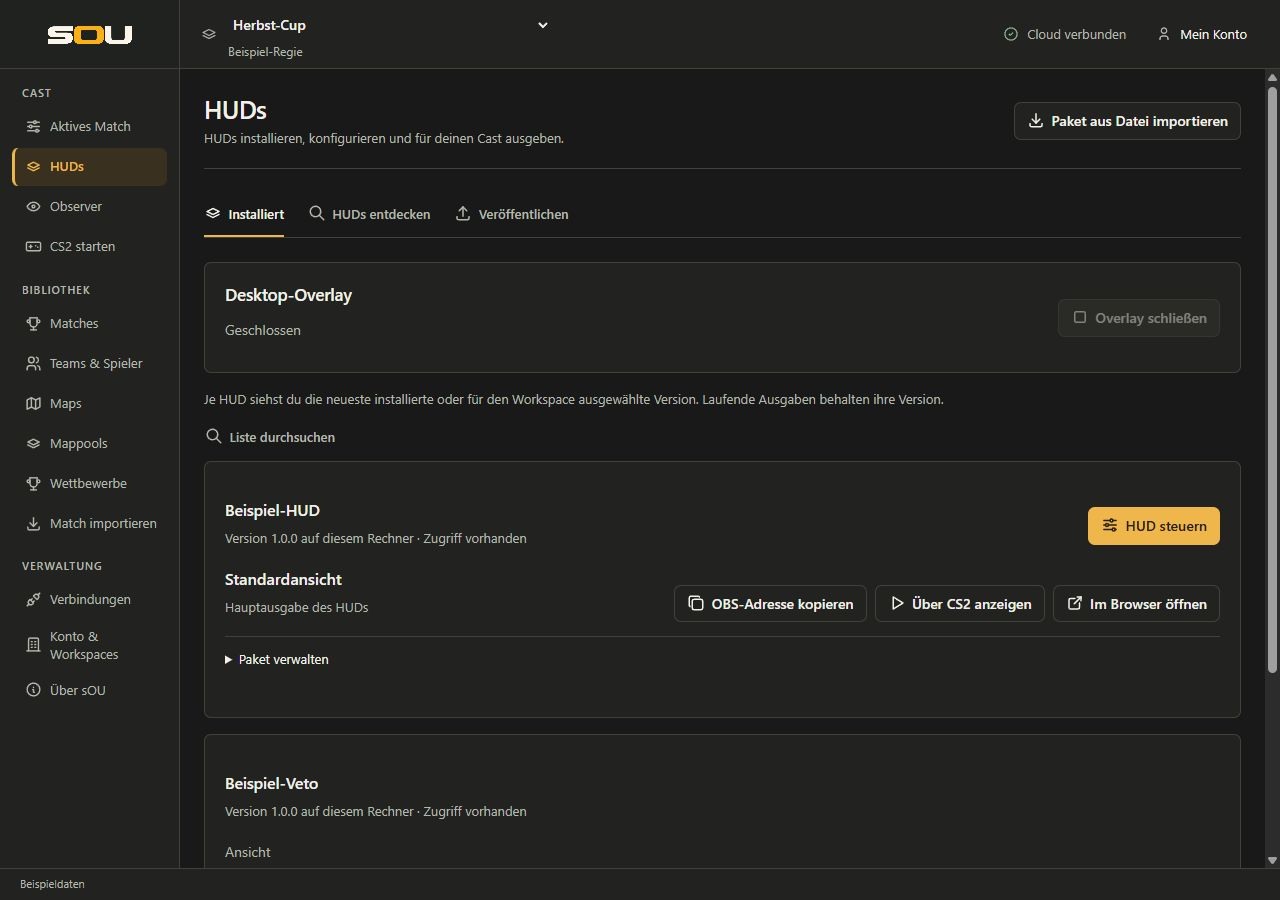
gamemust have the valuecs2.nameandversionmust be present. - Select sOU HUDs → Package from File Import and select the original archive.
- After successful import, configure the offered panel and open the output via sOU. For OBS take over the address offered there.
- Check the active match, the profiles and the current data connection. A correctly imported HUD cannot yet deliver a full live representation without GSI, required geometry or match assignment.
A source code ZIP with package.json and src is not automatically a finished browser package. Build it first according to the instructions of the HUD author. The sOU import does not run npm scripts and does not install development dependencies.
What Happens at Import
A manifest without native apiVersion field, but with game, is recognized as a legacy manifest. From the lower case HUD name sOU forms an identifier lhm-<name>; sequences of other characters are removed to form hyphens and outer hyphens. The name part may be 1–59 characters long after this normalization.
All original files are transferred under wwwroot. In addition, a native manifest is created with runtime: "lhm", apiVersion: 2 and entryPoint: "index.html". An existing thumb.png is used as a package logo. For action fields without label, the field name is added to the editor as a label; the original definition is retained as panel.json.original. HTML, CSS and JavaScript of the renderer are not redesigned or rebuilt.
Same normalized names give the same packet identifier, even for different authors. An already installed combination of identifier and version is rejected. There is no automatic renaming that separates two packages of the same name. Therefore, before a distribution, use unique HUD names and assign new versions for changes.
Original ZIPs are also subject to Archive and path boundaries. Inner spaces in file names are allowed. Panel selection values such as 2.5em are data strings and allowed; unknown field types or invalid section identifiers are not.
Normalize for sharing and cloud upload
Install the package tool via NuGet according to the Setting up templates and tools guide. Place original-hud.zip in the working directory created there and execute:
./werkzeuge/sou-hud validate ./original-hud.zip
./werkzeuge/sou-hud normalize ./original-hud.zip ./ausgabe/mein-lhm-hud.souhud
No prior conversion is necessary for the local direct import. The cloud package check, on the other hand, expects the native sOU format; normalize is used for this purpose. The result preserves the original files in the package envelope described. Rights of disclosure and licenses of the HUD author remain unaffected.
Scope of support
| Section | Support | Precise border |
|---|---|---|
| Connection | Engine.IO 4, Socket.IO root namespace, HTTP polling, registration, heartbeats and re-registration after Reconnect. | No WebSocket upgrade, Engine.IO 3, binary events, acknowledgments or other namespaces. |
| Live game | Map, round, sides, players, weapons, countdown, bombs and supported grenades from the existing sOU game data. | Incompletely displayable snapshots are not supplemented with substitute values; the required data sources must be connected. |
| Teams and players | Managed profiles, team logos and player images via expected local routes. | Fields that sOU does not own are not invented; Steam photos are not reloaded externally from an ID alone. |
| Match and veto | Active match, saved playable matches, explicit vetoes, team series points and map results. | Legacy match formats bo1, bo2, bo3 and bo5. A BO7 match is not issued as a BO5. |
| Panels | Text, counter, selection, pictures/picture lists, player/team/match references and one-time actions. | No global manager keyboard shortcuts, no refreshHUD tax contract and no automatic feature addition in the original bundle. |
| Radar radar | Included card assets and available GSI/HLAE geometry. | No import of a central LHM custom map catalog; catalog routes provide empty lists. |
| Killfeed | Real HLAE player_death events over update_mirv, without replaying past kills on first connection/reconnect. | No player_hurt transfer and no general MIRV event contract. |
| Camera and vMix | Defined empty camera list. | No camera transmission, WebRTC signaling or vMix control. |
| Tournament/provider services | Local match dates for the HUD. | No LHM cloud/premium services and no legacy tournament tree; the tournament route provides an empty list. |
Addressing and Socket.IO behavior
The stable address offered by sOU is /huds/{id}/. It loads the original under /compat/huds/{id}/{version}/ and sets isProd=1. This prevents the usual templates from switching to their development servers. Therefore, use the output address offered by sOU and not a hard-coded LHM development address.
The compatibility routes assign root API and socket.IO to the loaded inner address of a specific package version via the same-origin refererer. New outputs can choose a new version; already loaded outputs keep their version. API or socket calls from a foreign document without a matching package address are not allowed integration.
| Expiry/Event | Direction | Meaning |
|---|---|---|
/socket.io/?EIO=4&transport=polling | Client ↔ Host | Engine.IO handshake; the host does not offer transport upgrades. |
| Socket.IO connection to root namespace | Client - Host | The host confirms and sends readyToRegister. |
started | Client - Host | Is additionally accepted as a request for registration; not mandatory after Reconnect. |
register | Client - Host | The HUD identity must be {id}/{version} and the game cs2. Other usual registration arguments remain part of the template call. |
update | Hosts of HUD | Representable Legacy Game State as an Argument. |
match | Hosts of HUD | Indication of changed match context; existing clients load it via REST. |
hud_config | Hosts of HUD | Nested panel values for the bound package version. |
hud_action | Hosts of HUD | Object with action and data for a current release. |
update_mirv | Hosts of HUD | Supported new HLAE death event. |
registerAsHUD | Client - Host | Answer playersCameraStatus with empty list; no camera connection. |
The host uses Heartbeats with about five seconds apart and limited connections/buffers. A HUD that only enforces WebSocket cannot use the polling profile. For new sOU HUDs, the native SKU is more suitable than a new application on the legacy protocol.
REST routes of the compatibility profile
| GET route | Answer |
|---|---|
/api/match/current | Active centrally assigned match in legacy format or null, if not displayable. |
/api/match | List of displayable saved matches. Previews use the explicitly saved opponents A/B. |
/api/teams, /api/teams/{id} | Managed teams or a team with _id, name, shortName, country, logo, extra. |
/api/teams/logo/{id} | Original local image bytes with matching content type; missing image results in 404. |
/api/players?steamids=id1;id2 | Profiles; optional semicolon filter. Players marked as coach are excluded. |
/api/players/avatar/steamid/{id} | Object with custom for the existing local avatar reference and empty steam. |
/api/huds/{id}/{version}/{section}/{field} | Local image bytes of a declared single image field of the bound version; no-store. |
/api/camera | Object with empty availablePlayers array. |
/api/tournament, /api/radar/maps, /api/game-maps/cs2 | Empty arrays; no implemented central catalogs. |
All routes require the local browser session and a suitable version-bound package address as a referer. Unknown routes result in 404. The answers are intended for the existing legacy consumer; a native author should use the typed sOU contracts instead.
Data mapping and display limits
The HUD receives the processed sOU game data in legacy format. Complete GSI raw packages and authentication data will not be shared. The player direction and position preferably come from matching HLAE geometry, otherwise from existing GSI vectors. Observer digits are already 1…9,0; do not perform any additional conversion to the raw Valve indices.
A new legacy score requires a game, at least one player, map and countdown. In addition, each player spent needs a Steam ID and usable position/direction from GSI or radar. If these requirements are not met, no new update frame will be sent. An original HUD can therefore continue to show its last state. When a standing display first check data connection and geometry, do not expect a universal automatic blank display.
The central team assignment remains decisive. Screen order is customized for the renderer, but does not create a new identity. Missing or conflicting assignments remain open in match format. Original renderers may have their own team and profile caches; after changing names, photos or a change of identity, a conscious reload of the source may be required.
The host does not provide a second update argument with retroactive server-side damage/ADR round history. A legacy client can only collect its own statistics from its connection. He can thus not automatically reconstruct the entire match history at late entry.
Panels and images in legacy format
sOU continues to store panel values in its native version-related format. During the transfer, individual images and image lists are translated into the Base64 file contents expected from the legacy profile. In addition, original clients can load individual declared panel images via the REST route. The stored local media paths are not changed as a result.
Player, team and match fields are transferred as wrappers { "player": … }, { "team": … } and { "match": … } respectively. If the object is no longer present, the wrapper contains null. The usual profile fields are resolved from the library; missing information of origin is not invented.
Actions are only delivered to current subscribers of the respective version. After Reconnect, the state is sent again, no past action. A button declared in the panel is only functional if the original bundle actually handles its event. Further rules for saving and immediate actions are available under Panel transport and reconnection.
External fonts and images
The LHM/JT output route allows HTTPS stylesheets, HTTPS font files and HTTPS images; data/blob URLs are also possible for images. This allows original HUDs to obtain their integrated branding graphics and web fonts. These third-party resources require accessible providers and Internet access.
Scripts and live data connections remain limited to the local origin. A package that requires additional external scripts, a foreign API server or forms does not receive a blanket approval. Native sOU packages retain their own stricter rules for local assets. Import only trusted HUDs; the common origin is not isolation between any foreign scripts.
Narrow down the cause of a problem
- Import Fails: Built archive, CS2 manifest, name/version collisions, check path and panel boundaries.
- Assets are missing: Check relative paths and actual files in the ZIP; check accessibility of the original provider for HTTPS resources.
- No registration: Use the sOU output address, and check
isProd=1and Socket.IO polling instead of a hard-coded development server. - Connection stands, display awaits: GSI, countdown, player positions and active match assignment control.
- Reload Old names/pictures: source when the original renderer caches metadata.
- Button without effect: Check whether the original HUD processes the specific action; the import does not complement a missing renderer function.
For general output and OBS equipment, see HUD output. If you are re-engineering the source code of a HUD anyway, the native API offers the full sOU states without the additional limits of the legacy projection.